Tuesday, June 11, 2019

Group-Office 6.4 released!

We're proud to announce Group-Office 6.4.  In this release we've completely redesigned the address book, custom fields system settings and more!


Address book

The address book was completely redesigned with a modern look and feel. It's easier to use and integrates in other modules.


You can read more about it in the manual here:

https://groupoffice.readthedocs.io/en/latest/using/address-book.html

Custom filters

The address book is the first module to use the new custom filters feature. You can create reusable filters with your own conditions. They also work great in combination with custom fields.

For example you can create filters based on education:


Here's a screenshot of how you can edit the conditions:


Advanced query syntax

With the new advanced query syntax you can target very specific contacts in your searches.
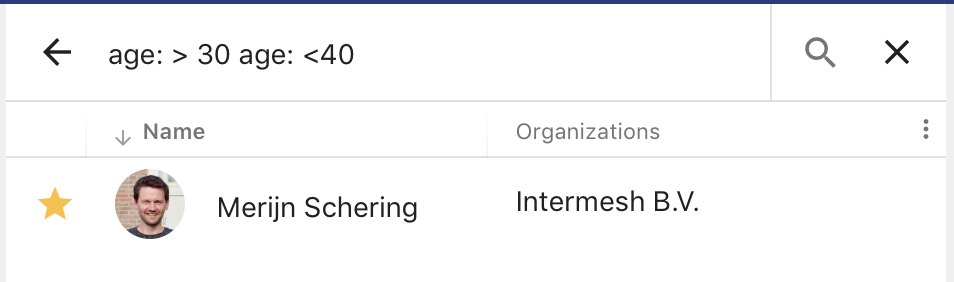


https://groupoffice.readthedocs.io/en/latest/using/address-book.html#advanced-search-syntax


Newsletters

The newsletters module is an easy tool to manage address lists and send out newsletters. Using powerful templates you can personalise your messages.

It's built in a way it can also use different modules as source for newsletters. This way it can integrate in a custom module too.

More information can be found in the manual:


Global search

The global search has a better look and usability improvements. Using full text indexing it's also much faster on large databases.


Read more about the query syntax in the manual:

https://groupoffice.readthedocs.io/en/latest/using/search.html


Custom fields

Custom fields have been redesigned to use the new framework. Custom fields can be added as tabs to dialogs or as field sets to the main properties tab.


Profile

A feature that was widely missed in 6.3 was the user profile in the address book. This is back now in 6.4. It's an optional feature now that only will add a contact when used.


Comments

Comments have a shiny new look:


LDAP Sync

Users and groups can be synchronised now.


Module permissions

A widely missed feature in 6.3 was managing module permissions per user group. This is back now:


Default permissions 

You can now manage the default permissions new items like calendars, address books, task lists etc. get when they are created.


Bookmarks

The bookmarks module backend has been refactored to work with the new framework.

Get started now

We hope you enjoy this new release! Get started now by following our installation or upgrade guide:


Monday, July 30, 2018

Group Office 6.3 released!

I’m proud to announce the release of Group-Office 6.3. This version is fully loaded with new features, performance enhancements and a brand new look and feel:

This is a first step of many towards a new GroupOffice platform. The new platform will have a standardised API, a better user experience and a responsive interface for optimal display on any device.

Fully open source

We’ve included all the synchronisation features in the open-source version as we've changed our view on our open source model. From now on GroupOffice Groupware will be fully open source.
We'll provide a solid open source groupware platform which:
  • Allows everyone to build their own modules 
  • Everyone to contribute to a secure and stable open source platform 
  • Flexibility in customising the platform
On top of this platform Intermesh we'll provide additional business oriented modules such as project management, billing and time tracking.

We'll also offer support contracts.

What’s new?

New theme

A brand new theme was made for this release which is also very easy to customise:


Core enhancements


  • Next to iOS and Android there’s full Windows 10, MacOS and Linux support for syncing e-mail, files, calendar and contacts.
  • Performance enhancements with our new JMAP based backend API and enhanced web client builder.
  • Two factor authentication
  • Improved installation procedure

System settings

The GroupOffice configuration file became very large. There were so many parameters so we felt it was time to bring it to a minimum with just the database settings in the file. Everything else will be configurable with the new “System settings” dialog:


Responsive

The interface supports responsive design now. This is still a work in progress but we’ve started using this in the Notes and E-mail module. They’re now both functional on tables and mobile touch devices.


Documentation

We’ve started with new documentation manuals to replace the wiki. You can find them here:

https://www.group-office.com/documentation.html

Docker

We fell in love with Docker. We’re using it as our development environment and we’ve also built an image for production use. You can find instructions in our installation manual.

Time to get started!

We hope that we’ve convinced you to upgrade to version 6.3 or start using this new version. You can find upgrade and installation instructions here:

https://groupoffice.readthedocs.io

If you need help Intermesh also provides support and tailor made modules. Contact us for more information at info@intermesh.nl

You can also try our demo:

https://demo.group-office.eu


Tuesday, June 26, 2018

Upgrading Group-Office on a Synology using Docker

Previously, I've written a post about installing Group-Office on a Synology NAS using Docker. Here's a writeup about how to update Group-Office.

1. Login to the Synology NAS web interface.
2. Launch Docker from the Applications menu.
3. On the "Containers" tab, stop the Group-Office container.
4. Select it and choose "Settings" -> "Export".


5. Save the settings to a folder on the NAS:


6. Delete the group-office container (Don't worry, your data will still be on the NAS).
7. Delete the intermesh/groupoffice image on the "Images" tab.
8. Download the new intermesh/groupoffice image on the "Registry" tab and wait for it to finish in the "Images" tab.
9. Import your previously saved settings file in the "Containers" tab:


10. Launch the updated container
11. Visit the Group-Office web page and the upgrade process should start.
12. Click continue to login to your updated Group-Office!


Monday, May 14, 2018

Install Group-Office on a Synology NAS with Docker


This is a walkthrough on how to install Group-Office on a Synology NAS with docker. Make sure you've installed Docker via the Synology package center.
  1. Launch Docker
  2. Go to the “Registry” tab and search for “mariadb”. Double click to download the latest:

  3. Search for “groupoffice” and install the latest “intermesh/groupoffice”:

  4. Go to the image tab and double click “maridb” to create a container called “godb”.
  5. Click on “Advanced Settings” and set in the “Environment” tab:
    MYSQL_USER=groupoffice
    MYSQL_PASSWORD=groupoffice
    MYSQL_DATABASE=groupoffice
    MYSQL_ROOT_PASSWORD=groupoffice

  6. Create a folder for the “/var/lib/mysql” volume in the “Volumes” tab.

  7. Click “Apply” to create the container.
  8. Now double click the “intermesh/groupoffice” container and go to the “Advanced Settings”.
  9. In the “Links” tab create a link to “godb” and call it “db”:
  10. Go to the "Volume" tab and mount a folder on "/var/lib/groupoffice":

  11. Review the “Environment” tab. Set apache server name and email:

  12. Check the port settings and launch your browser to the host and port. You should see the Group-Office installation screen. If you get the message "Please create a writable config.,ini" file then either /var/lib/groupoffice is not writable or the database connection can't be established. Please review those if you get that message.
  13. Finally you must add a scheduled task for GroupOffice. Go to Control Panel -> Task Scheduler on the Synology UI and choose Create -> Scheduled Task:


    Configure this command:

    /usr/local/bin/docker exec --user www-data intermesh-groupoffice1 php /usr/local/share/groupoffice/cron.php
  14. You're up and running!

Install SSL certificate

You probably need to install an SSL certificate too. This can be done easily. I've generated a Let's encrypt certificate at Control Panel -> Security:


  1. Right click on the certificate and choose "Export certificate". 
  2. Extract those files in a folder on the synology NAS called "docker/certs".
  3. The add a file called "apache.conf" and put this in:

    SSLCertificateKeyFile /etc/ssl/groupoffice/privkey.pem
    SSLCertificateFile /etc/ssl/groupoffice/cert.pem
    SSLCertificateChainFile /etc/ssl/groupoffice/chain.pem
  4. The folder on Docker should look like this:
  5. Edit the Docker container settings of groupoffice and mount this folder at "/etc/ssl/groupoffice"
  6. Check the SSL port settings and start the container. You should now have SSL!

Install license files

If you purchased additional modules from Intermesh you can install the licenses by mounting them in the Volume tab:


Monday, November 6, 2017

The Group-Office roadmap 2018

In this post we want to give you an update about the roadmap for Group-Office. Some time ago we announced the development of version 7.0. Version 7.0 was going to be a full rewrite with a completely new PHP backend and a new responsive web interface to replace the current ExtJS interface. We we’re working on this for about 3 years aside the regular Group-Office 6 development and tailor made modules we produce.

Despite that the development resulted in a very nice piece of software, we’re not going ahead with it. The current Group-Office is so feature rich that it was probably going to take another 3 years to completely replace it. Mainly because we’re a small team that’s also doing lots of tailor made modules 50% of the time.
So we decided to make a big change in the path that lies ahead. Group-Office 7.0 was a great learning experience and was packed with very good ideas. We’re going to take these ideas and incorporate them into Group-Office 6 more gradually. So it will slowly transition into what Group-Office 7 was meant to be. A responsive Group-Office with a more intuitive interface.

We think it will be better for our existing customers that can be migrated gradually and they will see new features coming in real soon!

We will start with rewriting the backend. We’ll use a standard protocol called JMAP (http://jmap.io) to support new clients in the future. That’s actually already near completion.
We will then start improving the current ExtJS based interface to work better on mobile devices and also make it more intuitive on the desktop.
Then we will start with redesigning each module one by one. You can keep track of our progress on our roadmap page:

Thursday, April 13, 2017

Get sales info with API call.

A customer asked how they could get all sales data from Group-Office on to a television screen. I've written this little script to get this info. Group-Office has no real API (yet) but it is possible to get this data.

The client class is used to connect to Group-Office and get's the year report data which they can use to display.

Because this might be useful to others I've written this tiny blog post:


<?php

class Client {

 private $host;
 private $curl;

 public function __construct($host, $username, $password) {
  $this->curl = curl_init();

  $this->host = rtrim($host, '/');

  curl_setopt($this->curl, CURLOPT_USERPWD, $username . ":" . $password);
  curl_setopt($this->curl, CURLOPT_RETURNTRANSFER, TRUE);
 }

 public function request($route, array $data = array()) {

  curl_setopt($this->curl, CURLOPT_URL, $this->host . '/index.php?r=' . $route);
  curl_setopt($this->curl, CURLOPT_POST, 1);
  curl_setopt($this->curl, CURLOPT_POSTFIELDS, http_build_query($data));

  $json = curl_exec($this->curl);

  return json_decode($json);
 }

 public function __destruct() {
  curl_close($this->curl);
 }

}

$client = new Client('https://example.group-office.com', 'apiuser', 'SECRET');

$data = $client->request('billing/report/yearReport', array(
  'start_date' => '01-01-2017',
  'end_date' => '31-12-2017',
  'books' => json_encode(array('2'))
    )
);

var_dump($data);


Thursday, November 3, 2016

Change the Group-Office database collation and character set

Recently we converted the Group-Office database to the collation "utf8mb4_unicode_ci". We did this to support 4 byte unicode characters. Some customers may want to use another collation because of sorting in the database. For example Danish users want to use "utf8mb4_danish_ci". You can choose any collation as long as it starts with "utf8mb4".
You can use this bash script to convert all tables in the database.
Make a backup first!
#!/bin/bash
DB="go61mb4"
COLLATE="utf8mb4_unicode_ci"
USER="root"
PASSWORD="SECRET"

(
  echo 'set foreign_key_checks=0;ALTER DATABASE `'"$DB"'` \
  CHARACTER SET utf8mb4 COLLATE '"$COLLATE"';'
  mysql -u "$USER" -p"$PASSWORD"  "$DB" -e "SHOW TABLES" --batch --skip-column-names \
  | xargs -I{} echo 'ALTER TABLE `'{}'` \
  CONVERT TO CHARACTER SET utf8mb4 COLLATE '"$COLLATE"';'
) \
| mysql -u "$USER" -p"$PASSWORD" "$DB"